Saturday, June 13, 2015

Campin Critters

Cricut has many cartridges and as most of you know I have a lot.There are 3 cartridges with critters on Create a critter, Create a critter 2 and Campin Critters. Campin Critters has a number of 3d images on and my sister Madge has decided to do the back pack a few times and hearing she was doing more I thought I would cut one out in Design space. Well first thing I noticed was that design space has 5 icons with the label backpack. OK so in CCR there are 5 pieces no problem BUT WAIT yes there is. the first icon brings in the back of the backpack plus the straps as well as the rest of the backpack so size to suit and its no problem , but the other 4 icons are not needed in design space so if you put the other 4 on you are missing the backpack as the other 4 are the bed roll, the pockets the top and the the bed roll sides. Just be aware in DS you only need the first icon. Now having all that out of the way we get to sizing. The backpack imported at a total height of 3.65 inches. It also comes in as a grouped image, this is so you can resize it in proportion.I sized the grouped image to a height of 17.4 which then tells you when you go to cut you need a 12x24 mat. But what it does it puts it on a 12x24 mat but it just fits inside the 12 inch mark so I happily cut it out on a 12x12 mat. With the bed roll the straps go around it but thinking that this was another little space something could get tucked into I used mini hook and loop dots from CTMH (z1805) $7NZ for 25 which hold the straps closed. I haven't added any dots onto the side pockets yet but I will as they will then close better. The front closes with the tag going into a slot in the backpack and the inside of the backpack can hold quite a bit. The inside dimensions of the backpack I made are 2.5 x 3 x 4.75 the bed roll is 3 x 1.5 so big enough for a small choc bar. The pockets could hold written messages. I do think it is cute and would make a nice male orientated gift. If you look on the side bar of my blog you will find a link to cricut where you can purchase the subscription this is one of the many cartridges which is in the subscription.
  free glitter text and family website at FamilyLobby.com

Friday, April 24, 2015

Spring Fantasy

I have been busy with my explore. I love 3d files and you will know I love the files from Mary at svgcuts.com. These are all cuts from svgcuts.com as they are having a Spring Challenge I have entered. if you go to their facebook page you can vote here.
Full details:
 Mobile users click here: or paste this link http://woobox.com/dw7h6d 
Facebook users click here: or paste this link https://www.facebook.com/svgcuts/app_451684954848385


 .
check out the milk jug and sugar bowl n the unicorns pulling the golden carriages
free glitter text and family website at FamilyLobby.com

Monday, April 13, 2015

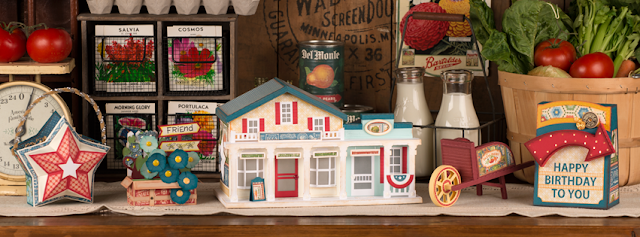
Mistletoe Manor

Svgcuts.com releases beautiful combinations of cards, scrap book pages embellishments and 3d projects. I am a 3d junkie I love things that I need to build. I remember as  very young child making paper houses and when I saw  Mistletoe Manor I fell in love. I am a Close to my heart consultant so I have packs of plane paper which with this project was awesome as I was able to use multiple pieces in the same colour. this project too 30 pieces of card stock and 3 sheets of vellum so it is a big project. The completed box is sitting on a mat whose grid is 12x12 so you can see its relative size. when I started to put it together I had not watch the whole of the video and I would encourage those that want to do this to watch the video all the way through. There are a few changes I have made from the original like the shutters on the 2nd story middle window, butterflies instead of snow and 6 of the pillars are yellow and 4 are blue. this is because I didn't watch the video and know what I was cutting. having said that I love it. Thanks to Mary and Leo from svgcuts.com.


. free glitter text and family website at FamilyLobby.com

Wednesday, April 1, 2015

Bunnys Bunnys Every where

this is Chocolate bunny from Creat a Critter 2 with a hole to take the stampinUp sweet treat cups. I filled them with jelly beans.

Chocolate bunnys again with a cupcake holder
then lastly bunnys front and back of egg holders
. free glitter text and family website at FamilyLobby.com

Sunday, March 22, 2015

Using Design Space to alter cards

someone was having problems in design space with the cards from Close to my Heart Artfully sent cartridge so I went in to see if I could help. One of the things you can do in design space is to slice but this doesn't work with an open path like in the 'dream' and you rock' scene cards. these have a half icon which shows when the card is folded in the z shape. the half icon leaves an open path ie the outside shape is not cut all the way round ie the guitar. I imported the cards ungrouped them then used hide contour to hide all but the shape or guitar. when I had the guitar half I duplicated it and then flipped aligned the images so they just touched then attached them. If you weld them the outer shape disappears.
this is the scene card 'You Rock' I made the separate guitar by this method.
this is the scene card 'Dream'  I cut a card where I added score lines and changed them to cut lines I didn't use the score lines already there as they came too close to the shape. I also cut the inside sentiment card from the right side part of the original card. if you use double sided paper you can use the reverse of what you have on the front. 
. free glitter text and family website at FamilyLobby.com

Monday, March 2, 2015

Superman for Grandsons

When my Canadian grandchildren were out to visit a few weeks ago I made Superman for them. I added a box underneath to hold some treats.


. free glitter text and family website at FamilyLobby.com

Learning Inkscape svg fies

After getting the Cricut Explore I wanted to try to do some svg files of my own. I don't know how to work inkscape well but when somone asked for a card with a curved front that resembled a die  I had seen I thought I would give it a go and make a svg file. These are the 2 cards I made with the file and I am very pleased with how they turned out. I used the basic svg file as a card and used a background from Design space and sliced it so I had the lattice in the front.


. free glitter text and family website at FamilyLobby.com

Monday, February 23, 2015

economise on paper with Design Space 2

As many of you will be aware I have a Cricut Explore machine. One of the things I loved about the previous Expression 2 and Cricut Craft room was you could put all the pieces on the mat where you wanted them to be because you imported each individually. In Design Space the image come in as complete and sometimes this means a part of a hat and the shoes may be the same colour but when you go to the cut screen you have the hat where the hat is and the shoes where the shoes should be. Great if you are doing layered vinyl but not good on paper saving. I discovered I could use the Slice feature to make this more economical and have done a screen video of this.
. free glitter text and family website at FamilyLobby.com

Tuesday, February 3, 2015

Thanks to Clever Someday for font


I watched a live broadcast, the lady Kay aka Clever Someday was on and talking about a font she designed that stood up from the page. This intrigued me and as it was free tried to download it but had problems. Well Kay has just sent out an email from her blog, https://cleversomeday.wordpress.com/2015/02/02/topcollege/ and it is well worth following her blog and also going to try this font. Her blog tells you all about it and how to use it in Design Space so go visit this very clever lady. She asked that if we downloaded the font we shared the info in our groups. Here is my first trial card. It will be for a photo of my grandie but in the meantime I have put in a background where the pic will go. The cards will be for my grandies Great Gran so I love the idea that the name can popup.


. free glitter text and family website at FamilyLobby.com